

-
Welcome to N-cars.net - the largest Hyundai N car forum. Check out the model specific sections below and scroll down for country specific forums. Scroll down for i30 N, Ioniq 5 N, i20 N, Veloster N and Kona N forums! Check out the i30 N Bible Here!
You are using an out of date browser. It may not display this or other websites correctly.
You should upgrade or use an alternative browser.
You should upgrade or use an alternative browser.
All good I got some 5 ampMy fusetap came with 15amp fuses, can these be used on the dashcam side ?


Anyone managed a hardwire in the MY22 Facelift i30N? Just tried but couldn't get it to work. The areas marked Spare on the old model are now blank and have no fuse. Tried it in them anyway but no joy. Tried it in the heated wing mirror too but same issue.
Anyone managed a hardwire in the MY22 Facelift i30N? Just tried but couldn't get it to work. The areas marked Spare on the old model are now blank and have no fuse. Tried it in them anyway but no joy. Tried it in the heated wing mirror too but same issue.
I've ordered a dash cam with hard wire kit and a couple of fuse taps. Hoping I will get it before end of the week and able to install into my FL over the weekend, I will let you know how it goes.
Have a feeling will need to buy a 10A fuse to go into the #1 slot of the tap given they are blank in the FL 'spare' slots. Failing that, will grab the old multimeter out, find a suitable fuse and piggyback off existing (non safety-related) component fuses.
Thanks for that! Will save us some trouble.I have recently installed a Blackvue, which uses both "Battery" and "Accessory" ie always powered and only when turned on. I also found that the "spare' fuses are blank.
For Battery, ie used the drivers seat fuse and for Accessory, I used the 7.5Amp A/C fuse.
See three posts up (#125). Mine is a FL.Anyone installed on a FL and can confirm a good fuse location to power on with ignition? Thanks
Did you get the two-channel or single channel model?I have recently installed a Blackvue, which uses both "Battery" and "Accessory" ie always powered and only when turned on. I also found that the "spare' fuses are blank.
For Battery, ie used the drivers seat fuse and for Accessory, I used the 7.5Amp A/C fuse.
I purchased a 2-channel Blackview the other day.
Although I haven't got around to installing it yet, I am wondering how the rear camera will mount, with the i30N being a hatch.
i.e. On a normal sedan the rear camera will mount thee same way the front camera does.
On a hatch however, the rear window separates from the main body of a car which would mean having to leave enough slack cable coming out of the trim at the back so that the cable can remain connected to the rear camera when the hatch lid is lifted
..... or did I just waste money on a two-camera dascham where the second camera can't bee fitted on a hatch???
Last edited:

you can, also have a 2-ch from blackvue, just mount it onto the upper most part of the back window, do a bit of cable management and leave a bit of slack line so you wont rip the cable off when opening the trunk
As Bu11eT said, just mount it on the back window. I fed the cable for mine through the rubber shoe/grommet thingy (sorry about the tech terms), that run the other cables etc from the roof area to the hatch. Removed the boot at each end then fed a thin bit of tie wire to through the tube part and used it to pull the cable through. Nice and tidy.Did you geeet the two-channel or single channel model?
I purchased a 2-channel Blackview the other day.
Although I haven't got around to installing it yet, I am wondering how the rear camera will mount, with the i30N being a hatch.
i.e. On a normal sedan the rear camera will mount thee same way the front camera does.
On a hatch however, the rear window separates from the main body of a car which would mean having to leave enough slack cable coming out of the trim at the back so that the cable can remain connected to the rear camera when the hatch lid is lifted
..... or did I just waste money on a two-camera dascham where the second camera can't bee fitted on a hatch???
If I recall correctly there is a description here on how to remove the plastic panel.
Taking a look at this now.As Bu11eT said, just mount it on the back window. I fed the cable for mine through the rubber shoe/grommet thingy (sorry about the tech terms), that run the other cables etc from the roof area to the hatch. Removed the boot at each end then fed a thin bit of tie wire to through the tube part and used it to pull the cable through. Nice and tidy.
If I recall correctly there is a description here on how to remove the plastic panel.
Have run cables (removing panels where needed or tucking under trim) and placement of the rear camera.
I have a question on where you folk have put the front camera so as to not obscure the driver's view.
I see a couple of options.
See badly drawn images below.
I can see two places the front go.
Either:
1) Stuck to the windscreen glass to the left or the right of the rear-view mirror. In either of the "1" positions in the image.
OR
2) Stuck to the plastic at the bottom of the section where the camera/radar looks out forward. In either of the "2" positions in the image. (Assuming the 3M adhesive stays stuck to the plastic as well as it would to the glass)
Videos of installing the Blackviews has it directly behind the mirror but due to the section mentioned in 2) above on the i30Ns, you can't actually get to the glass directly behind the mirror. This would be the ideal place as it completely obscures the camera from the view of the driver.
Seems to be a balance between making it inconspicuous to outside viewers and not blocking the driver's vision.
Which location have you folk mounted yours?

Also, re the hard-wiring cable. The cable that came with the cameras has the Accessory and always on connectors already spliced, but how did you connect these to the appropriate fuses at the fuse panel? The wires at the end of the hard-wire cable have the insulation removed removed but presumably there is some other cable/method needed to easily splice the the to cables into the respective fuses without soldering etc.
FWIW I am installing the DR900X-2CH.
Let me know if you need me to clarify the image above.
Didn't go far back enough in this thread.
Realised there are some pics.
Looks like I'll need to visit Supercheap for some cable splicer adaptors.
Realised there are some pics.
Looks like I'll need to visit Supercheap for some cable splicer adaptors.
Mine is mounted on the glass directly under the plastic shroud, such that the camera hides behind the mirror. The mount is between the lens / tunnel thingy and the breather vents in the plastic. Basically, in middle, but below where you have drawn your two 2's. I hope this makes sense.
Thanks mcb6110. The shroud makes it a little awkward to mount and takes up a fair bit of real-estate behind the mirror, hence wanting to know where other people are mounting them.
After looking back in earlier posts in this thread, I needed to re-route the cable from the back camera again as it needs to be routed via the trim panel under the curtain airbags. I'd originally run it via the trim at the top, so would likely have run into issues if the airbag deployed down the track.
Unfortunately this now has exceeded my skill level due to the panels being so tight below the airbag.
Tried but failed (fortunately not so epic that the airbag deployed ;-) )
Is there anyone in BNE who could would be willing to help me out with running the cables for a slab or other suitable bribe?
After looking back in earlier posts in this thread, I needed to re-route the cable from the back camera again as it needs to be routed via the trim panel under the curtain airbags. I'd originally run it via the trim at the top, so would likely have run into issues if the airbag deployed down the track.
Unfortunately this now has exceeded my skill level due to the panels being so tight below the airbag.
Tried but failed (fortunately not so epic that the airbag deployed ;-) )
Is there anyone in BNE who could would be willing to help me out with running the cables for a slab or other suitable bribe?
I used an electricians snake and fed it from the rear at the top of the hatch along the roof, above the lining and managed to get it to come out just beside the mirror cluster. I then taped the cable to the snake and carefully dragged it back to the rear of the car, well away from the air bags.
Got the idea from this or another forum (can't recall). Took a bit of juggling to get it back. I don't know what else is up there, that I was risking!
I think I have a couple of photo's somewhere.
Got the idea from this or another forum (can't recall). Took a bit of juggling to get it back. I don't know what else is up there, that I was risking!
I think I have a couple of photo's somewhere.
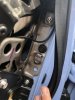
If you’re struggling for a fuse, I ended up using one of the wiper ones I think. I tried using the A/C one as suggested but because it’s right at the top of the fuse box, the fusetap wouldn’t fit because it was hitting the raised edge of the fuse box.