• Welcome to N-cars.net - the largest Hyundai N car forum. Check out the model specific sections below and scroll down for country specific forums. Scroll down for i30 N, Ioniq 5 N, i20 N, Veloster N and Kona N forums! Check out the i30 N Bible Here!

Engine I Finally found the oil temperature PID!

jeroenvde

Well-Known Member
Nthusiast
Mar 27, 2018
1,161
1,194
113
Belgium
Good news for all pre facelift i30N owners and probably Veloster owners too.
I finally found the PID to log oil temperatures thru the OBD port! ๐Ÿ˜

It took me a few weeks to learn about OBD modes and how to request and find hidden PID's, but I was determined to make it work this time and I did.
Sure you can look at the tiny bar on the instrument cluster which gives you a course idea of the temperature but when you take trackdays a bit serious you'll want something a bit more precisely.

22E001 is the PID for the engine CVVT oil temperature. This is tested on a MY2019 Hyundai i30N, so pre-facelift. Need confirmation of a facelift model to be sure it is universal.

Proof :
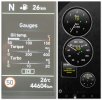
75.jpg

So what can we do with this?
When you have an OBD dongle and a smartphone you can log and view this value with apps like Torque or Racechrono. There are a few others I did not test yet.
I already made the calculations for these 2 apps.

Torque app [live view and datalog]:
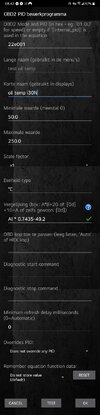
  1. set up the app to connect to your OBD dongle
  2. setting
  3. manage extra PIDs/Sensors
  4. ... Add custom PID
  5. accept warning
  6. insert data from screenshot (torque app.jpg)
  7. test connection, if all is good you get screenshot (torque app test.png)
  8. go back to main screen
  9. go to realtime information
  10. long click the screen -> add display
  11. choose a dial you like
  12. scroll and find your newly made extra PID (ex test oil temp)
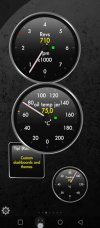
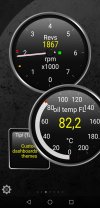
Screenshots_2026-02-27-08-42-27.jpgTorque app working.jpg

Racechrono pro [track timer, logger, live view]: my recommendation โœ…
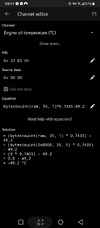
  1. set up the app to connect to your OBD dongle
  2. click + add vehicle profile, fill in make and model
  3. scroll down and enable test connection, make sure connection is working.
  4. scroll down to + Add channel
  5. insert data from screenshot (Racechrono app.png) don't change source data // if your dongle is connected and "use live data" is enabled you will get the live value
  6. click save
  7. go back to main screen
  8. click start
  9. change the layout to your desire, add the newly made extra PID (ex Engine oil temperature) !! you can only select engine PID's when your dongle is connected

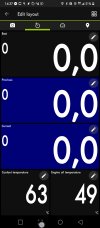
Screenshot_20260227-084139.png Racechrono working.jpg

Update 27.02.26: corrected the formula in the screenshots

Njoy guys! ๐Ÿ˜
 
Last edited:
@jeroenvde

seems to be working on FL 2021
adapter is vgate icar pro

Thank you for the confirmation Lurchi :) that is good news.

I have noticed on a trackday that from about 100ยฐC the reading is not very accurate and the cluster shows a higher oil temp vs the PID.

2 options here.
1. Cluster is correct and I need to calculate the offset
2. Cluster is a drama queen and oil temps are not the real world figure

To be sure I will need to unscrew the sensor, heat it and measure with an external device and compare
 
I've adapted your equation on an Elantra CN7 to this: -1*(((AI-32)*(AI-32)*(AI-32)*0.563440636533094/10000000000)-((AI-32)*(AI-32)*1.36331537033077/100000000)+((AI-32)*0.750194444444444)-23.9937)

Done this by comparing the value with the one received by using the AwesomeConnect Torque Pro plugin for actual data - play.google.com/store/apps/details?id=com.awesomeit.vehicleplus

Not sure if the exact same formula applies to i30N but might be worth giving it a try

For reference the PID details provided by the AwesomeConnect plugin for the oil temp are these:

obd_longPID37=-22DFAA
obd_equation37=NV*5.205641-93.5
obd_header37=7E0

But they only seem to work if you've got the app running - when I've tried setting these up manually it wouldn't work
 
  • Like
Reactions: Bu11eT
@jeroenvde may I ask how did you find out that this specific PID (0x22e001) and the AI token are used for the oil temp reading.

I'm asking as I've got a few more mode 22 codes and responses (by snooping on the BT requests sent to my OBD adapter) and I'm trying to work out which token is used for which PID and their formulas and thought that you might have some useful info on this :)

Thanks!
 
Hi guys, new i20N owner here.

I just took the car for its first trackday this month.
Just wondering if anyone has found brake pressure/position PID for either the i30N or i20N?

Might see if I can test the oil temp PID posted above this weekend if I got time.

Thanks :)
 
@jeroenvde may I ask how did you find out that this specific PID (0x22e001) and the AI token are used for the oil temp reading.

I'm asking as I've got a few more mode 22 codes and responses (by snooping on the BT requests sent to my OBD adapter) and I'm trying to work out which token is used for which PID and their formulas and thought that you might have some useful info on this :)

Thanks!
Hey man.

Well it took a whole lot of trail and error.
  1. Measure the oil temp sensor resistance. Find a potmeter to simulate the sensor and connect it.
  2. Ping a PID and see the data feedback (I have read somewhere Hyundai has these PIDs @ the 21-22 range)
  3. turn the potmeter
  4. wait 5 sec (important! since the ECU only transmits this PID on the canbus every 5 seconds)
  5. Ping the same PID again
Now if you see a change in the return value you may have a winner. Change the potmeter again to make sure.

Now go ahead and try to convert the hex value in to a usable decimal value.
 
Really impressive that you've managed to find it that way. Thanks for sharing it with us :)

If it helps I've got PID's worked out for the current gear, for tires pressures and temps which might be useful for your trackday logging:
  • Tire pressures: 0x22c00b (header 7A0) stored in tokens J, E, O and T which need to be divided by 5 to get the pressures in psi
  • Tire temps: 0x22c00b (header 7A0) stored in tokens K, F, P and U which need to have 50 deducted from their values to get the temps in C
  • Current gear: I'm just dividing RPM by Speed and should get a pretty specific result for each gear regardless of your speed. For a 6-speed manual the equation looks something like this in Torque Pro LOOKUP([0C]/([0D]+0.1):0:0.1~26=6:27~34=5:35~44=4:45~59=3:60~91=2:91~1300=1)

I'll definitely give your method a go as I'm still trying to find out the transmission oil temp without any success so far
 
It's getting interesting here ๐Ÿ˜ we should make a spreadsheet with known pids.

Best of luck with the DCT oil temp. I have a manual so can't help you there.
Just keep in mind the ECU only transmits this data on the canbus every 5 seconds. So be patient here when requesting the pids
 
  • Like
Reactions: gdincu
Really impressive that you've managed to find it that way. Thanks for sharing it with us :)

If it helps I've got PID's worked out for the current gear, for tires pressures and temps which might be useful for your trackday logging:
  • Tire pressures: 0x22c00b (header 7A0) stored in tokens J, E, O and T which need to be divided by 5 to get the pressures in psi
  • Tire temps: 0x22c00b (header 7A0) stored in tokens K, F, P and U which need to have 50 deducted from their values to get the temps in C
  • Current gear: I'm just dividing RPM by Speed and should get a pretty specific result for each gear regardless of your speed. For a 6-speed manual the equation looks something like this in Torque Pro LOOKUP([0C]/([0D]+0.1):0:0.1~26=6:27~34=5:35~44=4:45~59=3:60~91=2:91~1300=1)

I'll definitely give your method a go as I'm still trying to find out the transmission oil temp without any success so far
Thats awesome. Thanks for sharing the extra PID's, this will be super helpful on track. Just curious would you be able to share which tokens relate to which tyre for the pressures and temps please?

Thanks again!
 
  • Like
Reactions: gdincu
Thats awesome. Thanks for sharing the extra PID's, this will be super helpful on track. Just curious would you be able to share which tokens relate to which tyre for the pressures and temps please?

Thanks again!
On my Elantra the below apply:
  • Front Left - J/5 for pressure and K-50 for temp
  • Front Right - E/5 for pressure and F-50 for temp
  • Rear Left - O/5 for pressure and P-50 for temp
  • Rear Right - T/5 for pressure and U-50 for temp
However, it's worth mentioning that the Korean plugin I got those PIDs from uses different tokens (E, I, O and M for pressures and F, J, P and L for temps - just in case that my values don't work on your car). I've found those by looking at the response for 0x22C00B and matching the pressures against the values displayed in the dashboard.

Quick mention re the transmission oil PID (in case anyone is looking for that) - this plugin looks at 0x221A0 (Header 7E1) and token L (I believe that the equation for this is L * 0.75 - 48 but it's just a guess as I couldn't decode the equations properly so far). It doesn't work on my Elantra (even if it's a manual as well) but might work on your i30s
 
  • Like
Reactions: therealleifmadsen
It's getting interesting here ๐Ÿ˜ we should make a spreadsheet with known pids.

Best of luck with the DCT oil temp. I have a manual so can't help you there.
Just keep in mind the ECU only transmits this data on the canbus every 5 seconds. So be patient here when requesting the pids
I've added all of the PIDs worked out so far on a public github repo - https://github.com/gdincu/HyundaiElantraCN7-OBD2-PIDs

It would be a great idea to get PIDs from different Hyundai models as some of them seem to be shared across the entire model range.

Some of mine have been found on another public repo setup by owners of Hyundai EVs available at https://github.com/JejuSoul/OBD-PIDs-for-HKMC-EVs