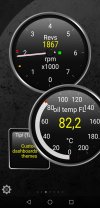
Good news for all pre facelift i30N owners and probably Veloster owners too.
I finally found the PID to log oil temperatures thru the OBD port!
It took me a few weeks to learn about OBD modes and how to request and find hidden PID's, but I was determined to make it work this time and I did.
Sure you can look at the tiny bar on the instrument cluster which gives you a course idea of the temperature but when you take trackdays a bit serious you'll want something a bit more precisely.
22E001 is the PID for the engine CVVT oil temperature. This is tested on a MY2019 Hyundai i30N, so pre-facelift. Need confirmation of a facelift model to be sure it is universal.
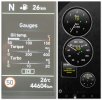
Proof :
So what can we do with this?
When you have an OBD dongle and a smartphone you can log and view this value with apps like Torque or Racechrono. There are a few others I did not test yet.
I already made the calculations for these 2 apps.
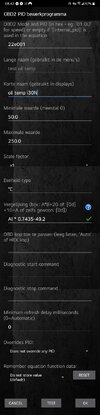
Torque app [live view and datalog]:
Racechrono pro [track timer, logger, live view]: my recommendation
Update 27.02.26: corrected the formula in the screenshots
Njoy guys!
I finally found the PID to log oil temperatures thru the OBD port!
It took me a few weeks to learn about OBD modes and how to request and find hidden PID's, but I was determined to make it work this time and I did.
Sure you can look at the tiny bar on the instrument cluster which gives you a course idea of the temperature but when you take trackdays a bit serious you'll want something a bit more precisely.
22E001 is the PID for the engine CVVT oil temperature. This is tested on a MY2019 Hyundai i30N, so pre-facelift. Need confirmation of a facelift model to be sure it is universal.
Proof :
So what can we do with this?
When you have an OBD dongle and a smartphone you can log and view this value with apps like Torque or Racechrono. There are a few others I did not test yet.
I already made the calculations for these 2 apps.
Torque app [live view and datalog]:
- set up the app to connect to your OBD dongle
- setting
- manage extra PIDs/Sensors
- ... Add custom PID
- accept warning
- insert data from screenshot (torque app.jpg)
- test connection, if all is good you get screenshot (torque app test.png)
- go back to main screen
- go to realtime information
- long click the screen -> add display
- choose a dial you like
- scroll and find your newly made extra PID (ex test oil temp)
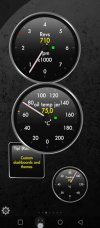
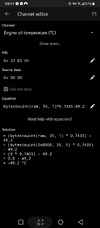
Racechrono pro [track timer, logger, live view]: my recommendation
- set up the app to connect to your OBD dongle
- click + add vehicle profile, fill in make and model
- scroll down and enable test connection, make sure connection is working.
- scroll down to + Add channel
- insert data from screenshot (Racechrono app.png) don't change source data // if your dongle is connected and "use live data" is enabled you will get the live value
- click save
- go back to main screen
- click start
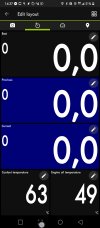
- change the layout to your desire, add the newly made extra PID (ex Engine oil temperature) !! you can only select engine PID's when your dongle is connected
Update 27.02.26: corrected the formula in the screenshots
Njoy guys!
Last edited: