
-
Welcome to N-cars.net - the largest Hyundai N car forum. Check out the model specific sections below and scroll down for country specific forums. Scroll down for i30 N, Ioniq 5 N, i20 N, Veloster N and Kona N forums! Check out the i30 N Bible Here!
How To: Headunit firmware & GPS navigation maps update
You are using an out of date browser. It may not display this or other websites correctly.
You should upgrade or use an alternative browser.
You should upgrade or use an alternative browser.


Just saw that as well, plus they fixed their widget not allowing me to unlock the app with a fingerprint when I tapped it, before it it just popped up the request and immediately closed. Now it stays so I can scan my finger.I've noticed a new list of car system status in the "vehicle report" section:

Anyone remember how to disable the speed limit signs on the navigation screen?
Ever since the last update I have mine visible and can't seem to find the right setting to uncheck it. Did they remove that setting or am I just looking at a wrong place?
The reason why I want to disable it is because that setting seems to overwrite the camera based speed sign recognition EVEN on the speedometer display. So it now takes it's data from maps instead of the camera (which is often outdated).
Ever since the last update I have mine visible and can't seem to find the right setting to uncheck it. Did they remove that setting or am I just looking at a wrong place?
The reason why I want to disable it is because that setting seems to overwrite the camera based speed sign recognition EVEN on the speedometer display. So it now takes it's data from maps instead of the camera (which is often outdated).

Just got my pre-FL updated and was looking for any differences in the interface.
Only one of note are the strange ugly oval things in N Custom settings. Why would they add them. They’re not even properly centred over the text…..

Only one of note are the strange ugly oval things in N Custom settings. Why would they add them. They’re not even properly centred over the text…..

Just got my pre-FL updated and was looking for any differences in the interface.
Only one of note are the strange ugly oval things in N Custom settings. Why would they add them. They’re not even properly centred over the text…..
View attachment 22075
I have that was well I think it's a bug
Considering how often we get updates (one per year) we’ll have to live with it for a while.I have that was well I think it's a bug
Has anyone tried going to a previous version? Does the system accept older software?

Ugh yup. Same issue. What a silly bugJust got my pre-FL updated and was looking for any differences in the interface.
Only one of note are the strange ugly oval things in N Custom settings. Why would they add them. They’re not even properly centred over the text…..

No it doesn't allow for 'roll-backs' unfortunately....Does the system accept older software?

Hello,
Has anyone managed to find the Variant coding menu from the Engineering mode on the latest software version, PD_PE.EUR.S5W_L.001.001.221223, on the 10.25 navi? I'm trying to make the AA work wirelessly, as I saw that it's possible on some 8 inch older infotainments? Thanks!
Has anyone managed to find the Variant coding menu from the Engineering mode on the latest software version, PD_PE.EUR.S5W_L.001.001.221223, on the 10.25 navi? I'm trying to make the AA work wirelessly, as I saw that it's possible on some 8 inch older infotainments? Thanks!
Read my post before you reply. I did on my car with success. It’s just a simple android, not rocket science.No it doesn't allow for 'roll-backs' unfortunately.
ITS POSSIBLE!
ok guys, i sat opposite to my radio and finaly found a way trial and error method on my car. Was a bit scared but after few it working. Can talk just about pre FL. I have second sd card with previous update from MAY 2022. From the Settings > Update you have got a popup, saying that older version cant be updated, but:
1. Insert SD card with older firmware
2. Go to Settings > Update and go to engneering mode (5 taps on the left side of UPDATE button and then 2 on the right side)
3. Type password, for me its 2702.
4. Go to USB Copy section
5. Click force update
6. voila!
i dont have already that ugly concept car with strange circles in N custom mode. And i also think it should work for all old versions with root ability etc.
I if get some free time to do a HOW TO, will do it
ENJOY your rolling back!

We will need a database with all older versions. I still have V112 wich really just works
Anybody here have an idea where I could download the latest firmware for my Kona N factory ICE system, keeping in mind we dont even the maps in South Africa.

I don’t often use the N Mode display but flicking through since the latest update and surprised to see that the Torque and Turbo graphs were maxed out and capped on the graph for the majority of the period of driving…which was hard to believe as I’d mostly been driving in 20, 30 and 40mph zones- certainly not flat out as the graphs insinuated.
Presuming it’s a software glitch…anyone else experiencing this or is it me?
Presuming it’s a software glitch…anyone else experiencing this or is it me?
I don’t often use the N Mode display but flicking through since the latest update and surprised to see that the Torque and Turbo graphs were maxed out and capped on the graph for the majority of the period of driving…which was hard to believe as I’d mostly been driving in 20, 30 and 40mph zones- certainly not flat out as the graphs insinuated.
Presuming it’s a software glitch…anyone else experiencing this or is it me?
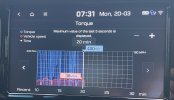
If it were true, it would have been one hell of a drive

So I updated my Pre-FL i30N from some 2020 version to the latest one, and ugh, wtf. Sorry. Been reading through the last few pages, but gave it a shot anyway. I think I'm gonna roll back...
Errors/bugs/flaws I've noticed:
1. Torque display on N-screen (see post above). Doesn't work at all, always maxed.
2. Crazy circles on drive mode selection screen.
3. No display when switching drive modes, not even the generic car model, except some small text on the top in an ugly font.
4. Switching the radio station from Favourites in the Radio menu, then going back to HomeScreen keeps showing the old station. It doesn't update the display, only in the Radio menu it is correct.
5. I don't like the Map/Nav display with those fading buttons, grey roads, everything grey, etc. Imo looks way worse than before. And the speed limit sign cannot be disabled anymore.
6. Sound quality got worse. I knew EQ settings change with every update, but nevertheless, I cannot seem to find a setting where it sounds roughly like before. I'd describe the "new" sound as more tinny and dull, somwhat bland, I don't know. Note that I have upgraded aftermarket speakers front and rear, which are actually quite good, were it not for the underwhelming performance of the standard amp...
7. Wrong date format for german locale. Don't know about other languages, probably also wrong?
Maybe I should try some version inbetween, not my old 2020.
Is there any consensus what the "best" version is and where would I get it from?
Thanks!
Errors/bugs/flaws I've noticed:
1. Torque display on N-screen (see post above). Doesn't work at all, always maxed.
2. Crazy circles on drive mode selection screen.
3. No display when switching drive modes, not even the generic car model, except some small text on the top in an ugly font.
4. Switching the radio station from Favourites in the Radio menu, then going back to HomeScreen keeps showing the old station. It doesn't update the display, only in the Radio menu it is correct.
5. I don't like the Map/Nav display with those fading buttons, grey roads, everything grey, etc. Imo looks way worse than before. And the speed limit sign cannot be disabled anymore.
6. Sound quality got worse. I knew EQ settings change with every update, but nevertheless, I cannot seem to find a setting where it sounds roughly like before. I'd describe the "new" sound as more tinny and dull, somwhat bland, I don't know. Note that I have upgraded aftermarket speakers front and rear, which are actually quite good, were it not for the underwhelming performance of the standard amp...
7. Wrong date format for german locale. Don't know about other languages, probably also wrong?
Maybe I should try some version inbetween, not my old 2020.
Is there any consensus what the "best" version is and where would I get it from?
Thanks!
Any idea when the next update is due?
I’m presuming ’May’ based on previous releases…the various bugs are starting to annoy me now
I’m presuming ’May’ based on previous releases…the various bugs are starting to annoy me now

May release postponed to early june...Any idea when the next update is due?
I’m presuming ’May’ based on previous releases…the various bugs are starting to annoy me now