• Welcome to N-cars.net - the largest Hyundai N car forum. Check out the model specific sections below and scroll down for country specific forums. Scroll down for i30 N, Ioniq 5 N, i20 N, Veloster N and Kona N forums! Check out the i30 N Bible Here!

How To: Headunit firmware & GPS navigation maps update

Hello,

I own a 2019 i30N and saw that there was an update since this November. I would like to know if you have already done it and if or if it is possible to have videos of the new features (design etc), and photo because nothing is visible on the net.

Good day to all

update : PDEN.EUR.SOP.V134.221102.STD_M
Up
 
I just recently updated the navigation software in my 2018 i30N, I think it was released in November. I selected the correct version and did all the steps correctly.
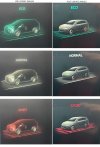
I’ve noticed that now when I change drive mode, the car image on the screen has changed and it looks absolutely terrible (see images), it doesn’t even look like a real car that Hyundai make. It used to be an outline of an i30 with a see-through look at the engine, suspension etc which I thought was pretty cool and there wasn’t any need to change it.
Has anyone else who’s already updated noticed this? Maybe it might even be a bug/glitch?
 

Attachments

  • F616EDA3-D85B-4830-91BD-0145D7BFAB86.jpeg
    F616EDA3-D85B-4830-91BD-0145D7BFAB86.jpeg
    294.5 KB · Views: 49
  • 23064F53-3F77-46FE-8F2A-6E156C071682.jpeg
    23064F53-3F77-46FE-8F2A-6E156C071682.jpeg
    306 KB · Views: 46
  • 2A26903F-CAF7-4E39-BAC6-B0BE6E5488E7.jpeg
    2A26903F-CAF7-4E39-BAC6-B0BE6E5488E7.jpeg
    297.1 KB · Views: 46
This was discussed in this very thread about a month ago, when the new version was released.

It's not a bug, it's a ... "feature" 🤦🏻
 
Yes, grey blob marshmallow style pictograph - someone let their three year old design them apparently - absolute rubbish.
 
Last update on i30N 2022(3) has some problems with the display of km in the Odometer of the BlueLink app ( it shows 0 ). Hyundai say that will be fixed in the next update of the Navigation System. ( for the moment its the only bug i found it ).
 
I attempted updating the navigation my in 2021 i30N FL and something failed.
The menus regarding the car settings are no longer available. I press the icon on screen, I get the beep sound and that's all. Nothing happens.
Navi, carplay, radio, N menu still work as intended.

I tried resetting the tablet via the phisical reset button. Did not work. Anyone encounter something similar?

Also, when I press the "Vehicle" button it errors out with "vehicle system connection is unstable. Please try again later".
output_optimized.gif
 
Hmmm, that sounds ominous - I assume you can't get to the screen where you can do the update again?

When you say the reset button did not work - did it actually re-boot or not do anything at all?

Not sure if any of these MIGHT work - just generic possibilities:

Disconnect the main battery for 10 minutes
or
Press and hold the reset button, say for 10 secs, after inserting a USB stick with a fresh copy of the firmware - it might just look for an update file during boot up?

Edit: Just remembered - IF you can get into the BlueLink menu and choose disable that does a full reset of the system
 
Hmmm, that sounds ominous - I assume you can't get to the screen where you can do the update again?

When you say the reset button did not work - did it actually re-boot or not do anything at all?

Not sure if any of these MIGHT work - just generic possibilities:

Disconnect the main battery for 10 minutes
or
Press and hold the reset button, say for 10 secs, after inserting a USB stick with a fresh copy of the firmware - it might just look for an update file during boot up?

Edit: Just remembered - IF you can get into the BlueLink menu and choose disable that does a full reset of the system
I tried the usb&reset. Nothing happened. It said that there is no content on the stick. Checked, there was.

Then I disconnected the battery for 15mins and when it came back to life it worked.

All in all, fixed. 11/10 for emotion factor, 6/10 for update experience.
 
Brilliant - glad you got it working.

Just proves the original basic instructions for anything electronic - if it throws a wobbly, switch the power off (battery in this case), wait, then switch on again📴🔋😁
 
I expected the navi to reset via its dedicated button and I also expected it to have a separate battery module (hence the dedicated reset button). Maybe it intended to communicate with another module which requited a hard reset and that was connected to the 12V battery.
 
No, I don't think it has its own battery - maybe for the clock but it does not really need that as it has GPS sync. At least it has not got the totally illogical, alien power control system that Mazda have fitted on my wife's CX-30 - every time you even go NEAR the car in possession of the key fob it powers up a multitude of systems and if you happen to leave a door open, whilst vacuuming for example, then it powers up even more circuits "ready to go" with the result that if you take too long or do it too often without driving the thing in between times the result is a flat or even deep discharged battery!

Probably just a glitch in communication with some module or other as you say.

I have done 2 updates on my Kona N and both have involved different procedures - the first, after it had done about 20 mins of "Verifying" told me to switch the engine off and the update would then continue, the second most recent one insisted I leave the engine on all the time?

It also usefully informed that leaving the engine idling (for up to an hour) may breach local regulations - really helpful! I have always (on this and previous vehicles with similar systems) gone for a drive whilst it is updating - that's the beauty of having an automatic transmission, as long as you remember to disable the start/stop thingy then you know you are not going to stall or stop the engine.

Disappointing, seeing as the vehicle has its own built in data SIM, that it won't do OTA updates itself overnight or something.

 
I have noticed after updating mine a difference in the speed camera warnings.

Previously I had a “ding dong” when approaching the camera and if I was even only one mile an hour over the limit a constant “ding ding ding”

Now I have the “ding dong” when approaching the camera but only get the over speed “ding ding ding” indicator if I’m 10% plus over the limit. For example in a 40 area the warning goes off at 45mph, in a 60 I think it was 66mph.

I preferred the original method.
 
You guys lucky your systems work. Here in South Africa Hyundai couldnt be bothered to get the maps for the country in our i30n and Kona N.

They say we do have nav, apple car play!!
 
  • Like
Reactions: woodbar
You guys lucky your systems work. Here in South Africa Hyundai couldnt be bothered to get the maps for the country in our i30n and Kona N.

They say we do have nav, apple car play!!

Well, that's pretty mean of them!

I thought I was eagerly awaiting the AA facility on mine but I have not actually even tried it yet - hoped it might be wireless but it seems you only get that with the standard and not the later wide screen versions? Can't be bothered with plugging/unplugging a cable to the phone every time I drive!
 
Well, that's pretty mean of them!

I thought I was eagerly awaiting the AA facility on mine but I have not actually even tried it yet - hoped it might be wireless but it seems you only get that with the standard and not the later wide screen versions? Can't be bothered with plugging/unplugging a cable to the phone every time I drive!
Thats why I use the carplay2air adaptor. Works ok

Would prefer the cars onboard nav
 
Thats why I use the carplay2air adaptor. Works ok

Would prefer the cars onboard nav

Yes, the on board nav is quite reasonable and I really like the fact I can send a destination to the car from my phone (only Bluelink app though📱) so Postcodes are much easier especially as ALL the onscreen touch functions on the screen are orientated for L/H drive which is a reach in my R/H drive!

Seems Hyundai thought that moving the wheel, pedals and speedo over to the right was good enough!