• Welcome to N-cars.net - the largest Hyundai N car forum. Check out the model specific sections below and scroll down for country specific forums. Scroll down for i30 N, Ioniq 5 N, i20 N, Veloster N and Kona N forums! Check out the i30 N Bible Here!

How To: Headunit firmware & GPS navigation maps update

Did it already. Also all phone permissions are as they should. Today it wanted to pair all together again as I started the car 😁 I'm going to delete the whole Bluetooth connection and just use Android auto and see how it goes. I definitely didn't have those problems before the latest car infotainment update.

Edit: now I'm reading the Bluetooth connection is mandatory for wired Android auto...well that sucks 😅
 
I can confirm that after the last update the headunit/phone is asking for contacts permission almost every time but I'm ignoring it... seems to be a bug
 
  • Like
Reactions: PernusGre
Tried to unpair and delete phone from car, car from phone, reset the infotainment, reboot the phone, pair again. Worked for a while and then it wants to pair again or doesn't download contacts...I'll blame the latest i30n update here since it never happened to me before that.
 
  • Like
Reactions: RasherN
Tried to unpair and delete phone from car, car from phone, reset the infotainment, reboot the phone, pair again. Worked for a while and then it wants to pair again or doesn't download contacts...I'll blame the latest i30n update here since it never happened to me before that.
Have you tried resetting the head unit?
 
I mean I have tried it...I just wrote the infotainment means the head unit since I've mentioned it reseting in the previous post.
 
I only have one phone on Android 11, can't try another for my rides... everything updated, bt always on. I use wired Android auto basically everytime and works fine but I get prompts like these on pictures. And yes, I've re-paired them a few times from scratch and it worked for a while.
 

Attachments

  • Screenshot_2022-07-19-22-27-13-866_com.miui.home~2.jpg
    Screenshot_2022-07-19-22-27-13-866_com.miui.home~2.jpg
    109.2 KB · Views: 21
  • Screenshot_2022-07-19-22-27-17-426_com.google.android.projection.gearhead~2.jpg
    Screenshot_2022-07-19-22-27-17-426_com.google.android.projection.gearhead~2.jpg
    99.5 KB · Views: 21
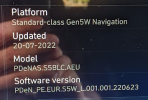
I got my new i30N FB yesterday and saw that the garage had not updated it so I did that today. Although the updater said it was the May 2022 update I can see various parts that have June date e.g. 220623

Screenshot 2022-07-20 201736.pngScreenshot 2022-07-20 201743.png

There was also two distinct update parts that looked identical, they went from 0% to 100% saying they were doing the exact same thing, but the second one was far quicker.

Does anyone know if there's a possibility that Android Auto wireless will ever be enabled for my car or is that not possible? After the update I did try to connect but it didn't work.
 
Wireless aa isn't available and most likely won't be on i30n since it has built-in navigation... Something something license
 
I have a big problem updating my head unit (96550-S0100) it is 8" screen. The software version is PDEN5DR.EUR.SOP.V085.180104.STD_M. Unfortunately, I cannot update this software. After downloading the software for the I30N from the Hyundai official website in version PDEN.EUR.SOP.V126.220421.STD_M and trying to install it to the unit, I get a message from the head unit which reads: "The map sd card is not compatible with the software version. Insert the correct SD card. '

Where is my mistake. How can I update this head unit?
 
I have a big problem updating my head unit (96550-S0100) it is 8" screen. The software version is PDEN5DR.EUR.SOP.V085.180104.STD_M. Unfortunately, I cannot update this software. After downloading the software for the I30N from the Hyundai official website in version PDEN.EUR.SOP.V126.220421.STD_M and trying to install it to the unit, I get a message from the head unit which reads: "The map sd card is not compatible with the software version. Insert the correct SD card. '

Where is my mistake. How can I update this head unit?
Have you tried to update with a USB stick? I use a 32GB on my FL.
 
I have a big problem updating my head unit (96550-S0100) it is 8" screen. The software version is PDEN5DR.EUR.SOP.V085.180104.STD_M. Unfortunately, I cannot update this software. After downloading the software for the I30N from the Hyundai official website in version PDEN.EUR.SOP.V126.220421.STD_M and trying to install it to the unit, I get a message from the head unit which reads: "The map sd card is not compatible with the software version. Insert the correct SD card. '

Where is my mistake. How can I update this head unit?
Are you 100% sure you downloaded the correct version of the software.