• Welcome to N-cars.net - the largest Hyundai N car forum. Check out the model specific sections below and scroll down for country specific forums. Scroll down for i30 N, Ioniq 5 N, i20 N, Veloster N and Kona N forums! Check out the i30 N Bible Here!

How To: Headunit firmware & GPS navigation maps update

On the update site is something wrong with date and a lot more bugs in version info.
I updated to new version but it is the same - maps are only change.

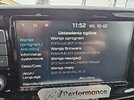
Here is the picture of OLD software:
old.jpg

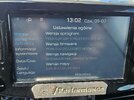
And here is the picture of NEW update:
new.jpg
 
On the update site is something wrong with date and a lot more bugs in version info.
I updated to new version but it is the same - maps are only change.

Here is the picture of OLD software:
View attachment 27903

And here is the picture of NEW update:
View attachment 27904
You can check the software and maps version before you install. This on is purely a map update, so just plug it in and go. No update needed.
 
You can check the software and maps version before you install. This on is purely a map update, so just plug it in and go. No update needed.
I did full update because on their update site was like I said before - bug in version.
Inside navigation updater tool you can see few weird things:
1- notification at the bottom of the page say last update is from february
2- after chosing the car in the small window - month of release is 07.2026 and version is v140.241023
3- software from february was x140.251023..........
So......they mess it up badly.
 
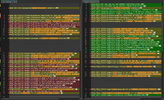
When I did mine I still had the files from the February update so I took a copy of the "version" file and compared it to the newer file, OLD->NEW:
1783613805633.png

Definitely a few changes, but haven't noticed anything yet.
 
The website still shows February 2026 as the latest, but if you select it and follow the links to show the latest software versions they are the July 2026 numbers. I see that i30N 2017-20 is shown as V140.241023.STD_M, this is clearly wrong as shown in the photo.

When I search by model it shows the same number, so again wrong.

Then going to the Navigation Update tool, there it again shows the same number, yet again wrong. At least they are consistent.

So for the i30N 2017-20 it is purely a map update.
 
  • Like
Reactions: HY1000
Just done my i20N (failed the first time which it’s never done before*). According to the info there are some stability and phone connection improvements - we shall see. Overall it seems pretty benign though and hasn’t changed anything obvious.
* I did mess about a bit with the climate control on the first go and that may have thrown it - it’s very hot here.
 
Just done my i20N (failed the first time which it’s never done before*). According to the info there are some stability and phone connection improvements - we shall see. Overall it seems pretty benign though and hasn’t changed anything obvious.
* I did mess about a bit with the climate control on the first go and that may have thrown it - it’s very hot here.
I haven't had any issues while doing the updates. I did mine on Friday on a drive up to Scotland for the weekend, today I sat in my wife's i10 on the driveway and I too was messing around with the climate control with no issues.

One thing I have noticed when doing the update on a drive, if you use MyHyundai trips feature, it goes offline and the distance to the restart is not recorded.
 
Last edited: