• Welcome to N-cars.net - the largest Hyundai N car forum. Check out the model specific sections below and scroll down for country specific forums. Scroll down for i30 N, Ioniq 5 N, i20 N, Veloster N and Kona N forums! Check out the i30 N Bible Here!

How To: Headunit firmware & GPS navigation maps update

On the update site is something wrong with date and a lot more bugs in version info.
I updated to new version but it is the same - maps are only change.

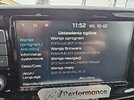
Here is the picture of OLD software:
old.jpg

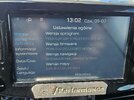
And here is the picture of NEW update:
new.jpg
 
On the update site is something wrong with date and a lot more bugs in version info.
I updated to new version but it is the same - maps are only change.

Here is the picture of OLD software:
View attachment 27903

And here is the picture of NEW update:
View attachment 27904
You can check the software and maps version before you install. This on is purely a map update, so just plug it in and go. No update needed.
 
You can check the software and maps version before you install. This on is purely a map update, so just plug it in and go. No update needed.
I did full update because on their update site was like I said before - bug in version.
Inside navigation updater tool you can see few weird things:
1- notification at the bottom of the page say last update is from february
2- after chosing the car in the small window - month of release is 07.2026 and version is v140.241023
3- software from february was x140.251023..........
So......they mess it up badly.
 
In my experience when they do bug fixes it will always be a new version number. If the software version is the same number then there isn't an update.
 
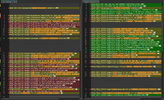
When I did mine I still had the files from the February update so I took a copy of the "version" file and compared it to the newer file, OLD->NEW:
1783613805633.png

Definitely a few changes, but haven't noticed anything yet.