• Welcome to N-cars.net - the largest Hyundai N car forum. Check out the model specific sections below and scroll down for country specific forums. Scroll down for i30 N, Ioniq 5 N, i20 N, Veloster N and Kona N forums! Check out the i30 N Bible Here!

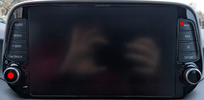
Headunit stuck on Hyundai Logo

Mrtraffic

New Member
Mar 13, 2025
8
0
1
Germany
Hello everyone.
I have a head unit from an i30N. Part No: 96550S0100PMP.
Something probably went wrong with the software update. The device is stuck on the Hyundai logo. Resetting it using the small button doesn't help. The radio is playing on the previously set channel. You can also adjust the volume.
Maybe someone has a tip on what to do.
I saw several slots for small connectors on the bottom of the device.
Is there a CMOS clear like on a PC? Or are there tools to install the software directly?
 
Try to plug in a keyboard into the USB and hold CTRL+ ALT + DEL until it reboots. It should go into the recovery mode and restore firmware from recovery. Or if you have an older version of the software installed, you can create your custom boot recovery image and use that, but it works only on older software as the new one requires signed firmware.
 
I experienced this issue as well when I updated the headunit (Hyundai i30N 2019) without keeping the engine running. As a result, the unit shut down before the update was completed, which caused it to become bricked. If I’m not mistaken, I tried the following method to unbrick the head unit:
  1. Plug in a USB keyboard.
  2. Repeatedly press ALT + PRINT SCREEN + E while slowly typing REISUB to safely restart the system.
  3. Alternatively, typing REISUO will perform a shutdown instead of a restart.
I managed to get the unit to start, and everything seemed to work except for the car's Live Services, such as Live Traffic and Weather, which were no longer functioning. Instead, I received a prompt stating: "An error occurred during initialization of the service. Please contact your dealer." I took the car to the dealer, and after investigating the issue, they were able to fix it without replacing the unit.

I hope this gives you some guidance.
 
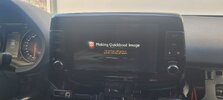
Ok. I pluged in a USB Keyboard. Pressed Control-Alt-Del
Now i'm in recovery Mode. But nothing happened now... it just stuck in this screen
 
Ok. I pluged in a USB Keyboard. Pressed Control-Alt-Del
Now i'm in recovery Mode. But nothing happened now... it just stuck in this screen
What software is required on the SD card? Exactly the one that is installed or any software for the deviceWhatsApp Image 2025-03-19 at 11.47.24.jpeg
 
Don't turn it off. It can take a few minutes to create this quickboot image. Give it 10 minutes at least. You can have whatever software you want on SD card.
 
for now it run since 1 hour. Nothing changed. Do i need the car for this. Headunit run on my kitchentable with 12v power of a PC Power Unit.
Wheres rhe Boot Image located?
Can't see anything happend, just the screen i post yesterday....
 
It should do the recovery from internal backup. If this is not working, there might be an issue with it as well. How old software is it running? If it's a older one, we can create our custom recovery image and re-install it using that. If it's new version, it won't work as they added RSA signature check in newer firmware.
 
It was running on an older firmware. Not the newest but not the oldest. It is now mine so i can say it right.
The issue comes if my friend make a Update.. the headunit shut down while the update was working.
is the unit run linux? What is the working system? How do i can make a custom firmware?
 
I made a recovery image for you. Download this zip file, unpack it and place directory security_force on a USB drive. This directory contains 7 files. So make sure, you have correct structure on a USB drive. There should be only one single scurity_force directory and inside it all the 7 files. Nothing else. Remove SD card from headunit, otherwise it will try to do recovery from SD card and fail, connect USB drive and reboot into recovery mode by holding power button and map button at the same time while pressing reset button with a pin. Reset button is that small button under volume know, which is possible to press only with a toothpick or some pin. One note is that when you press powerbutton, it turns off the screen and then it's hard to see if something is happening. What I do is I first press the power button to turn off screen and then do the recovery sequence, as it will turn on the screen while holding.

1742467762235.png
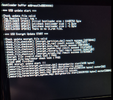
If you have old enough firmware, you should see something like this
1742467913081.png
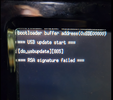
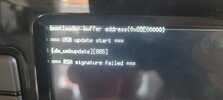
Just be patient, it will go through multiple reboots, but eventually it should work. If you get this RSA signature error
1742467948805.png
It means your firmware is too new and recovery works only with a signed recovery image. That can be provided only by Hyundai, question is, if they will give it to you or you will have to ask them to do the recovery procedure and pay for it. Good luck and let me know if anything is unclear.
 
now i have a problem right?
du you have any idea where i can ask for this? an email adress or something
WhatsApp Image 2025-03-20 at 12.31.47.jpeg