Hello,
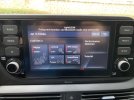
I bought my i20N without bluelink/navigation. Even though I own the car soon 1 year I noticed only today that on the display (touchscreen) I do not find the possibility in N mode to show me the vehicle information. If I go into the N menu I can only make the settings for the configuration.
My question, you need the Bluelink navigation package to show the extended vehicle information in N mode on the display?
Example display - I didn't / or couldn't find that
I bought my i20N without bluelink/navigation. Even though I own the car soon 1 year I noticed only today that on the display (touchscreen) I do not find the possibility in N mode to show me the vehicle information. If I go into the N menu I can only make the settings for the configuration.
My question, you need the Bluelink navigation package to show the extended vehicle information in N mode on the display?
Example display - I didn't / or couldn't find that
Last edited: