• Welcome to N-cars.net - the largest Hyundai N car forum. Check out the model specific sections below and scroll down for country specific forums. Scroll down for i30 N, Ioniq 5 N, i20 N, Veloster N and Kona N forums! Check out the i30 N Bible Here!

new i30N '25 Software for 2021+ FL

St54Kevin

Member
Nthusiast
Jan 15, 2024
85
32
18
Germany
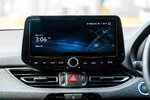
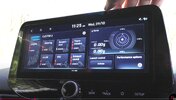
So I had this thought for a longer time, that in the past there was always somebody editing Update files to their custom liking and I wonder if somebody tried to get into our i30FL files. It came up again now as the new new FL is release in Australia that has a digital dash and the new N menu software on the head unit. It features the same cool new N menu as the i20N and I wondered if there is a possibility to get that onto our FL head units. It seems that the hardware for it stayed the same:
1738925085159.jpeg

Here is the i30N 2025 N menu:
1738925277194.jpeg
1738925494033.jpeg

I had a look into update files, but those are pretty much encrypted and beyond my entry level coding knowledge :D
 
Last edited:
I was looking into update files for PFL as I wanted to remove annoying safety message. It's actually not that hard, but getting update into the car is quite complicated. That's the part I was not able to finish so far, there are a lot of features in the software we can enable/disable, but firmware is signed by the private certificate we don't have. I maybe found a way around it (you can force update using engineering menu and it looks like it's not verifying signature), but I did not have time to test it yet. If I will manage to get an update into my car, I will create a "how to", explaining how you can modify your firmware and unlock/disable some functionality.

Also for people who wants to enable remote start, I believe it's possible by editing firmware, I just need to confirm it, as I found the functionality mentioned in it, it's just disabled based on your region (same goes with safety pop up, it's enabled only for certain regions, you just need to change you region and it's gone)
 
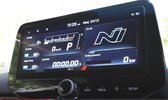
I was just looking for the same. To be honest the N Performance dashboard in the 2021 FL is not that great as a dashboard. The layout for the 2025 FL is much more informative.

Have you ever managed to bring it over? I'm thinking about trying to upload the 2025 FL firmware to the car from the Navigation Updater, but since that also has the digital cluster, I don't think it is compatible...
 
  • Like
Reactions: MatthiasR.
I was just looking for the same. To be honest the N Performance dashboard in the 2021 FL is not that great as a dashboard. The layout for the 2025 FL is much more informative.

Have you ever managed to bring it over? I'm thinking about trying to upload the 2025 FL firmware to the car from the Navigation Updater, but since that also has the digital cluster, I don't think it is compatible...
Nope, never tried it. I guess as soon as you wanna load the file, it wont even update, because model number is different. I would love to see the software on our FL1 :( I mean the screen is the same
 
There is a method how you can upload a different firmware, but if something is incompatible, you will end up buying a new headunit. You need to have two USB drives, one with old firmware and one with new. You start the update with an old one, which is for your HU. In the beginning, the process checks all the checksums and signatures and also if model code matches. If all is correct, it starts copy of the firmware without further check. The trick is, that you have to quickly swap USB drives right after checksum check finishes and it will copy firmware from another USB. But before that, you also need to change password on a ZIP file which is inside, as that password is calculated based on parameters from current firmware, which will not match. It's a lot about timing, you can figure out when to switch, if you dump logs onto USB drive. I think that in my case it took around 20 seconds? And then I had to quickly swap.

Disclaimer: I was doing it while I messed up my HU and I was not able to install official version as I flashed incompatible version. I did on PFL and I would definitely not recommend doing it, as it might be a different revision of HW where they just changed one part and it might be completely incompatible and you will bypass security check.
 
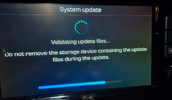
Just to add some more details, during validation, it took around 20 seconds waiting and quickly swapping USB

1772120432961.png
If you do it too early, it fails immediately. If too late, it will start copying wrong files and fails as you disconnect during copy.
It also works because RSA signature of a ZIP payload is checked before copy so you new ZIP with new password without RSA signature will get copied over without a problem.

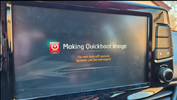
If by any case you mess up very badly, there is a backup quickboot image stored in HU. Just plug in a keyboard and hold CTRL+ALT+DEL until you see a quickboot recovery
1772120647125.png
 
Hi all,

first post here, so I can't send PMs yet – apologies for putting this in
the public thread. If a mod wants to move it, fine by me.

I'm trying to get hold of an older firmware for my i30 N and I've run out
of official options. Details:

Car: i30 N MY2020, Gen5W Standard (10.25")
Current: PDeN_PE.EUR.S5W_L.001.001.260128
Maps: EUR.18.52.69.012.622.5

Builds I'm after (any one of them):
221223 (12/2022) – EUR.15.47.67.025.621.5
230601 (06/2023) – EUR.16.41.71.014.621.5
240726 (07/2024) – EUR.17.45.49.013.622.5

The official site / Navigation Updater now only serves 260128 – everything
older has been pulled. I've already been through update.hyundai.com, the
Updater itself, the Wayback Machine and the usual forums, with no luck.

So, two questions:

1) Does anyone still have one of those packages on a disk or USB stick?
Even a partial copy would help: sw_backup.tar + *.ver + NEW_TarList.txt*
is enough, I don't need the whole 25 GB.

2) Has anyone tried cross-flashing a Hyundai Gen5W Standard (S5W_L)
package from another model? All S5W_L cars in the official list share
the same map version (EUR.18.52.69.012.622.5), which suggests the
content is identical and only the model prefix differs – so a Kona
(OS_E_PE), Tucson (NX4e) or i20 (BC3) package might work after
renaming. I'd rather hear from someone who actually did it than
gamble on my own head unit.

And a technical one for anyone who has decompiled this stuff: is the
downgrade on PDeN blocked by the build.props check, i.e. do I need a
patched "downgrade package" for an older build, or will a plain ZIP from
an archive install? Also – does PDeN_PE hit the same file format change
(navi1.tar -> S5W_MAP_ALL_EUR_*.zip) that on the Kona was solved with the
221129 intermediate update?

Happy to pay for the upload / your time, and I won't redistribute
anything without the owner's permission. If I get it working I'll post
the full procedure back here.

Thanks!

 
You should check out https://gitlab.com/g4933. Those guys did hack the LG Headunit of the Facelift (which isn't running Android like the PFL) and documented it pretty well. There is also a research paper floating around about how to hack the firmware.
Apparently downgrading works if you replace the .lge.upgrade.xml of a old update with a new one. I'm guessing you need to have a new update that isn't installed jet for it to work. The Repo also has a downloader where you can specify which version you want. I haven't tried it myself jet though.. Maybe you can use the same method to update your FL software to the 2025 FL2 Software 🤔

Are those versions easy to get into the Engineering mode or why those particular versions? On my update i can only access the dealer mode. Please report back if it works / your progress!
 
  • Like
Reactions: Bu11eT